Tuesday, March 11, 2014

Thing 16

Hmm...Audio. Does anyone want to hear me talk? Yeah maybe...anyway. I'm having difficulty finding how to get this app into my professional life, but I do have ideas; again, if not for me, for my colleagues that are participating in the program and/or following my blog.

As the mobile things website says, audio apps can be used to make podcasts/webcastsor to interview an author or presenter. They could be used to record a speaker at a program. They could be used as training tools. Audio can be combined with other media for any of the above examples, though there are specialized apps for that. 

On a personal level, an audio app can be used in the same way we once used tape recorders. You could capture your young child's first words or early speech. You could sit down with a family member and have them spin a yarn (though they only have a limited amount of time). Record Grandma. Add what you'd like here...

I think at this point, as said, I don't have much professional use for an audio app but I do want to explore the examples on the 23 Things page for my own use.

Audioboo...the Vine of audio apps? Three minutes really isn't a lot of time, especially for someone that has a lot to say...like me. I suppose it's a good tool to create sound bits, record quotes or make a real short pod/broadcast, but I wasn't overly impressed with Audioboo.

I looked at ipadio but quickly decided it's not for me. It's very cumbersome to use; going online to access my recordings? What's mobile about that?...No way to easily embed links and of course, I'm not interested in making yet another account, especially one that wanted a phone number, just...no, thank you.

So, that leaves me with SoundCloud...I said what the heck and signed-in/up via Facebook. I was greeted by this 
You're working on filling my stream? How? Not to be cynical (I'm in a cynical mood today, I guess) but are you using FB data to process what I like? Am I just missing a step? 

Moving along...I recorded a short, silly sound http://soundcloud.com/steve-mannie/sounds-from-tuesday-evening/s-78UjD yes, I said that...

The only downside to SoundCloud is that there are limitations:  2 hours of audio, unless you fork up some $ for more! There is the option of clearing unwanted or unneeded recordings to free up time, of course. 

As I said, I signed into SoundCloud with Facebook and it does gives us Twitter tweeters options to share there too, along with a few other social media platforms. That's a plus, if I wanted to share to an already established network, anyway.

I'm finding myself most impressed with SoundCloud. I found it easy to sign up, and I like that you can choose where and how to share, for the most part. I was too impatient to wait for my stream to be filled, but based on the description, that might be kind of fun. 

In the end, I still have little use for an audio app at this time, but if I did go with one, it would be SoundCloud.


Thing 15

Oh boy, another one I'm struggling with. "Infographics" this is a new term to me and I really don't know how to apply it professionally, let alone personally.

I'm starting with info.Graphic. This app is mostly a collection of infographs others have already made; it's mostly a reference point, a place to go for ideas...and I really wasn't impressed. There are great examples on there, but the app performed horribly for me; it froze, wouldn't open my selections and downright annoyed me. 

I really wanted to try making an infographic, but for the life of me, I couldn't think of a subject! I did take a look at I Visual info touch, but I didn't do much with it.

I did like learning about infographics and apps for them, I just can't connect to this thing...I do think they have use, visual learners and other arenas where graphics are a must, but I really have little use for them.

Thing 14

Well, maybe I've hit the part of 23 things were I'm stretching to figure out how to use these apps in a professional sense; don't get me wrong, I still enjoy the program and discovering apps, it's just getting difficult to weave them in to my profession. As I've stated before (I think) I'm a "para"; different systems would call my position different things, but to sum it up, I mainly do circulation and customer service related functions and the occasional librarian's aide type of thing...anyway, with that said, I'm going to go ahead and discover Magisto. I'm sure I can find a way to integrate that into my personal use (I do have an adorable little girl after all) and maybe I can piggyback off some ideas that are given on the 23 things website and possibly offer ideas to my colleagues that are following my blog and/or this program some ideas.

Vine? Too short and really just silly. 6 seconds goes pretty fast...

Viddy's 30 second limit is a bit more reasonable, but still pretty low. I suppose you could do a quick overview of a program or a really short introductory type video, but I still don't see a lot one could do with 30 seconds.

Socialcam is probably the most feasible app for professional use IF I had a use for it. The other thing I just thought of is if I was making a professional-themed video, I'd have to be careful where and how I share it since our communications department is supposed to be in charge of that...might get in a little trouble. 

Magisto sounds kind of fun. It would probably be more for my own use rather than anything professional, but it does sound appealing. I do like that I can sign in as a guest rather than create yet another account to forget. You have more limited options, but it's a good way to explore the app. I made a very, very silly video using some photos already on the iPad.
It did take an obscenely long amount of time to "make"...I'd share it, but you have to register to do that so, sorry.

Of course, if you want premium content, you pay a premium on Magisto. That's the turnoff. That and it took what seemed like HOURS to "make" my video. Never notified me either, even with notifications allowed.

All in all, if I absolutely had to keep one of these apps, it would be Magisto, it's not as social network-y and it has some fun options and it uses my device's native camera. It would have to be more for my personal use since I have no reason to make a video for work; even if I did, my library system has people for that and I believe it's probably best to defer to them...


Thursday, March 6, 2014

Thing 13

Thing 13, presentations. This is going to be a thing I'll stretch on when doing since I have no personal or professional use for a presentations app. I will certainly browse the apps listed on the 23 Things website, but I know I'm going to struggle to incorporate them into something coherent.

What piques my interest most is Educreations. I do see it is more for teacher-student/classroom use, but it interests me anyway. I do see that there are suggestions on how to use it in libraries...but my device won't let me watch it. I say well, fine then, I'll discover it myself. HA!

I made a silly, kind of pointless, general intro to iPad and apps. I was pretty impressed with the app, its ease of use and after playing with it and looking at other examples, I think I could see ways for librarians and support staff to use Educreations. The most obvious way would be in a training or tutorials with staff, either remotely or in person. Since you can share your lessons (that's what Educreations will call your document) they could easily be viewed as webcasts, podcasts, etc if shared. I have no clue how, but the lesson could probably be shared amongst a group without iPads and could be used in meetings and training. If we had a professional, we could even use Educreations (or any presentation app) and have him or her create presentations that are linkable and viewable on our website, I'd suppose.

If you want to waste 2 minutes hearing me talk (and the stupid fan for our data cabinet) follow the link. I did this for my sole educational and informational purposes only.  All characters appearing in this work are fictitious. Any resemblance to real persons, living or dead, is purely coincidental...wait no, I mean any resemblance to other lessons, etc are purely coincidental (humor break...).


I think this is the only app for this thing I want to try. See above for my recommendations on how we as library staff can use presentation apps as training tools. 


Tuesday, March 4, 2014

Thing 12

Thing 12, Books, Books an more Books. Nice commentary on how books and libraries continue to be equated, even in this day and age; computers are a close second, but even heavy computer users expect some books in a library.

Op-Ed aside, it's time to talk apps...and a different op-ed.

Wattpad looks nice, though I'm not interested in the social media aspect of it. Maybe if I read a bit more, I would be or if I wanted to discuss what I do read (which, according to many, I do) I'd be more interested. I'll glance at the app anyhow and give my thoughts. 
I'm glad to see that there is a HUGE selection...not sure if it's millions as claimed, but who's counting? I do see that there is a nice featured section with what seems to be popular, new-ish titles and breakdowns of normal categories. I am a heavy non-fiction and occasionally alternative history reader, so these were the areas I looked at. Pretty cool to see that here too, things are broken down by popularity, age and into a suggested "undiscovered" category. There's also original stories that can be shared and created, a neat community.
I was impressed by Wattpad, but I just don't see myself using it much personally. I think it could make a good readers advisory tool, though I don't do much of that in my job. If nothing else, it's something to recommend to our patrons and help them discover it more on their own.

Moving down the list, I decided to take a peek at Freebooks. I am amazed by the fact they do have a modern section, though you're not going to find anything by Stephen King or published by the conglomerates there. Here's a quick screenshot quote of what their modern section is, in  nutshell
Other than that, yes, most of their material falls into the classic lit category. I do like that they further group these classics by author, genre, etc and make it easy to navigate. Take a look
I selected Jane Austen as an example because, well, I assume she's fairly well known...as you probably see, included is a mini biography and a list of available titles. If you look toward the top of the screen, you can see examples of other authors and categories.
I did like the ease of downloading, the "bookshelf" graphic and the actual interface of the ebook. I understand there's a highlight feature, but if couldn't figure it out.
Bottom line, I do enjoy some classic lit and this app is very pleasant to use, is visually appealing and also has a social aspect that I'll say refer above to my thoughts on Wattpad for...where Freebooks lost me was ADS TOO MANY ADS (this piece of opinion brought to you by the New York Times...for further access sign in now or sign up for the low introductory price...) now of course there is premium edition for a small fee that among things, removes ads, but then thing it's no longer FREEbooks...

iStoryBooks was what excited me the most when I first browsed this mobile thing. I have a 3 1/2 year old budding reader and iPad expert. Perfect chance to combine two of her favorite activities...or at least use the iPad as a learning device rather than her attempting to play Angry Birds on it...in all seriousness, I have some great educational apps and I'm always looking for more. 
The app initially comes with roughly 25 accessible books, which is the amount listed in the app description on the 23 mobile things website came from...maybe they've added a few since that time. As you may have seen and probably could guess, there is premium content too.
This app is wonderful and simple, it could be used by anyone, kid or adult, device expert or novice. Some aspects are a little hidden, but once found, can be tailored to the experience you want. For instance, you select a book from the initial menu, then it downloads. By default, the book will have the "read to me" selected, though that can be disabled if you'd like to read or want the child to read it aloud on their own. You can also select movie mode, which will automatically change the page for you. 
The only beef I have with this app is that the selection is a bit spartan and those hidden features I mentioned. I should mention that I personally can't see this app being all that great on a phone.

iStoryBooks is going on my personal iPad ASAP. My child will love it and it fits perfectly into what my wife and I want from our iPad, it will be fun and educational! As for professionally, I have no immediate use for it, but I could see this app being used for storytimes, or in lieu of mixed media. I could see sitting down with young children that had to come to the library not by choice, but out of necessity (such as parent, sitter, sibling needing to come, even if the little one didn't want too..happens, a lot.) and trying to improve their experience a little by showing them this app.

While the other suggested apps for this thing look nice, I have no personal or professional need for them at this point, so I decided against exploring them.


Tuesday, February 25, 2014

Thing 11

The first thing I did for Thing 11 was take a look at the ELM site. I'm using an iPad, so I can't speak for smartphone users, but I liked the overall look and presentation, it's not too much different from the PC/web version. I didn't delve into it much, though I encourage others, especially reference staff that haven't, to do so. It's a great resource for all and has sections dedicated to professionals and the public. I suppose a lot of the info and databases on ELM's site can be found on one's library site, but I do like having another option and even something just different than what I'm used to.

I looked at HCL's mobile app since it is the app of my local system in addition to that of my employer. Outside of work, I rarely use any other system...I think I've been to Anoka and that's really it. 
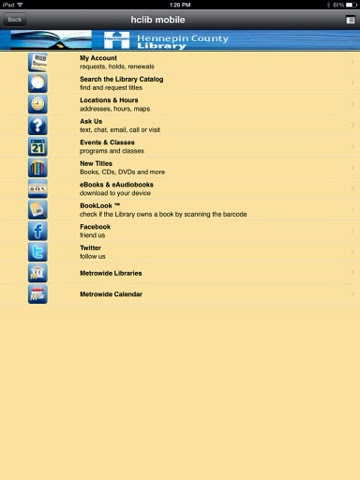
Long story short, HCL mobile seems optimized for phones. Not that it can't be used on a tablet, but personally, I just go to the "regular" site via Safari on my home iPad. I've been using photo examples for a while...so why stop. Here's how the mobile app home looks on an iPad 

 And here's Hclib.org on Safari on an iPad
Since I can gesture to zoom, etc. I prefer using the regular site. There are some instances where the mobile app is superior; one instance is BookLook, which uses your device camera as a scanner and allows you to scan the ISBN code on a book and after it's identified, you can get a short summary of the item and see if any HCL branches own it. I had a tough time using it with an iPad, but I was successful, eventually. It is pretty nifty, but probably makes more sense on a phone than a tablet...say I'm at a bookstore, see something awesome...then I see the price. I can go to BookLook via HCLmobile and see if we have it anywhere for checkout. Or if I'm on the bus, plane, etc and I see something cool the person next to me is reading, I can scan the ISBN and see if we have it in HCL...with said person's permission I suppose.
The mobile app works with our ebook section a little (key word is little) better. It's just a slightly different process with a different interface. It's smoother,  but sometimes it's nice to get all the info you'd get via the web version of our ebook catalog. I tried downloading both via our mobile app and the web...and I was successful and I will say I still prefer the web version.
Another strong point of our mobile app is if you're in a hurry or like going through less steps, taping the sections (ie catalog) is a little more seamless. 
My final thought though is that HCL mobile is more for a smartphone user and while it offers all the basics (account info, catalog, IM, locations, etc) in a easy to use interface, I like the web version more since it is more in-depth and it is useable with a tablet.

Onto Thing 11, "part 2"
HCL has an entire section dedicated to mobile apps, see below
Personally, I use Zinio since I like it for magazine browsing; including the ebooks I downloaded for this thing, I have now used OverDrive all of 3 times. I do like ebooks and enjoy them on my iPad, it's just that since my iPad rarely leaves home and since it is shared by 3 people, I don't use it much for ebooks since I won't have time to read the books before the app automatically returns them.  I wouldn't say my system promotes ematerial over physical, but we are seeing increased ematerial downloads and checkouts and staff is starting to field more questions. 
Once in a while Zinio can be handy for us as a tool to show the public since they can access a magazine our location doesn't have, but one we subscribe to, etc. To reiterate, I like to use it since I just "flip" through the mags at my leisure then remove them when I'm done.
I've used Freegal to download free, legal (get it) music, but I'm not the biggest fan of it on mobile since it saves the songs to its own app rather than iTunes/music and they can't be moved (I've tried and according to Freegal, it can't be done). If you don't mind having a second or third app for music, by all means, check it out. Of course, you can find Freegal in our databases on hclib.org and download to a PC or Mac and then synch it over to your device.
The biggest complaints I hear about ematerial use is all the log in and log out and passwords, etc. The most annoying (to me) is the adobe account with OverDrive...but once you get the initial resistance out of the way, it's hardly noticeable.

Saturday, February 22, 2014

Thing 10

For thing 10, I decided to try out Snapchat. What drew me to Snapchat is that it is privacy friendly and allows you to select receipients. 
Personally, I usually go with Facebook for photo sharing. As I stated in a previous blog, I wholeheartedly welcome alternatives since I hate Facebook's Orwellain ideals and how once something is on Facebook, it's there forever...the downside of using Snapchat and/or Instagram is that I don't have as many friends/followers/fans,etc and wouldn't reach as much of an audience. From a professional standpoint, that doesn't matter too much since photo taking, editing and distribution aren't really a facet of my job. My system has PR professionals for that, though I suppose if there were a display I helped a librarian with or something of that nature, it wouldn't hurt to add it to some sort of professional portfolio.

Tried Snapchat...all I have to say is, um...no one to share with. The picture is pretty boring anyway, no point in sharing.

So, I went to Instagram, logged in/registered via Facebook and oh my, did I find a lot of friends to follow. Funny thing though...they post the same pics to Facebook, which to me, seems a bit redundant...oh but what's this I've learned Facebook acquired Instagram about 18 months ago, so no wonder...I still took a little time to explore and found a few neat things. One, it took all of 5 minutes for a couple of my friends to follow me (apparently, I'm just that interesting...and popular wink wink nudge nudge) I see that Hennepin County Library (HCL), my library, has an Instagram account. I have nothing to share at this point on my Instagram, but if you'd like to search, eventually I might have something there.

In the end, I prefer Snapchat, I'm a self admitted social network junkie (80 tweets in 4 days btw) but I hate Facebook and by extension, Instagram's takes on privacy. Instagram has built in followers and since my library system already has a page there and since I have followers, this is what I think I will go with.